Media Credentialing, Modernized
Introducing full-strength media credentials collection, processing and reporting for events with even just a few media – built for college athletics communications
1What do you need from a new media credentialing process?
Reduce your admin work?How:
Stand-alone online media applications add no-longer-necessary work because everything after media click ‘Submit’ is manual, whereas with CredsControl, applications arrive in season and event review queues, and you approve or deny each in one click. Approval and denial emails, in your words, go out automatically. Making badges is easier, and the included check-in tool records badge collection and no-shows for you.
All so you can spend less time on admin work and more time doing PR to increase coverage.
- Media apply
- Manually add applications to your credentials spreadsheet (removed by CredsControl)
- Manually research unfamiliar media (removed by CredsControl)
- You decide
- Manually email approvals and denials to each applicant (removed by CredsControl)
- Manually make badges (removed by CredsControl)
- Manually make will‑call list and record badge pickups (removed by CredsControl)
- Badge handover to media
- Manually export media attendance for files and tracking (removed by CredsControl)
Improve game, season and cross-sport credentials reporting?How:
You control every report column, the filters that determine what media, outlets, games and sports are displayed, the sort order, and any graphics to highlight or emphasize what is on the report. Unlike Excel, the report toolkit is purpose-built for credentials reporting, for your tracking files and for department leaders.
Tighten event security?How:
- Each badge can have a photo for event-site checks, painlessly
- CredsControl researches unfamiliar applicants, and you still make every decision
- Visiting-team media officers vouch for their own media
- Simplify zone-access assignment
- Check-in tool records badge collections and flags no-shows
- Email or SMS urgent messages to approved media quickly
Simplify credentialing for your media?How:
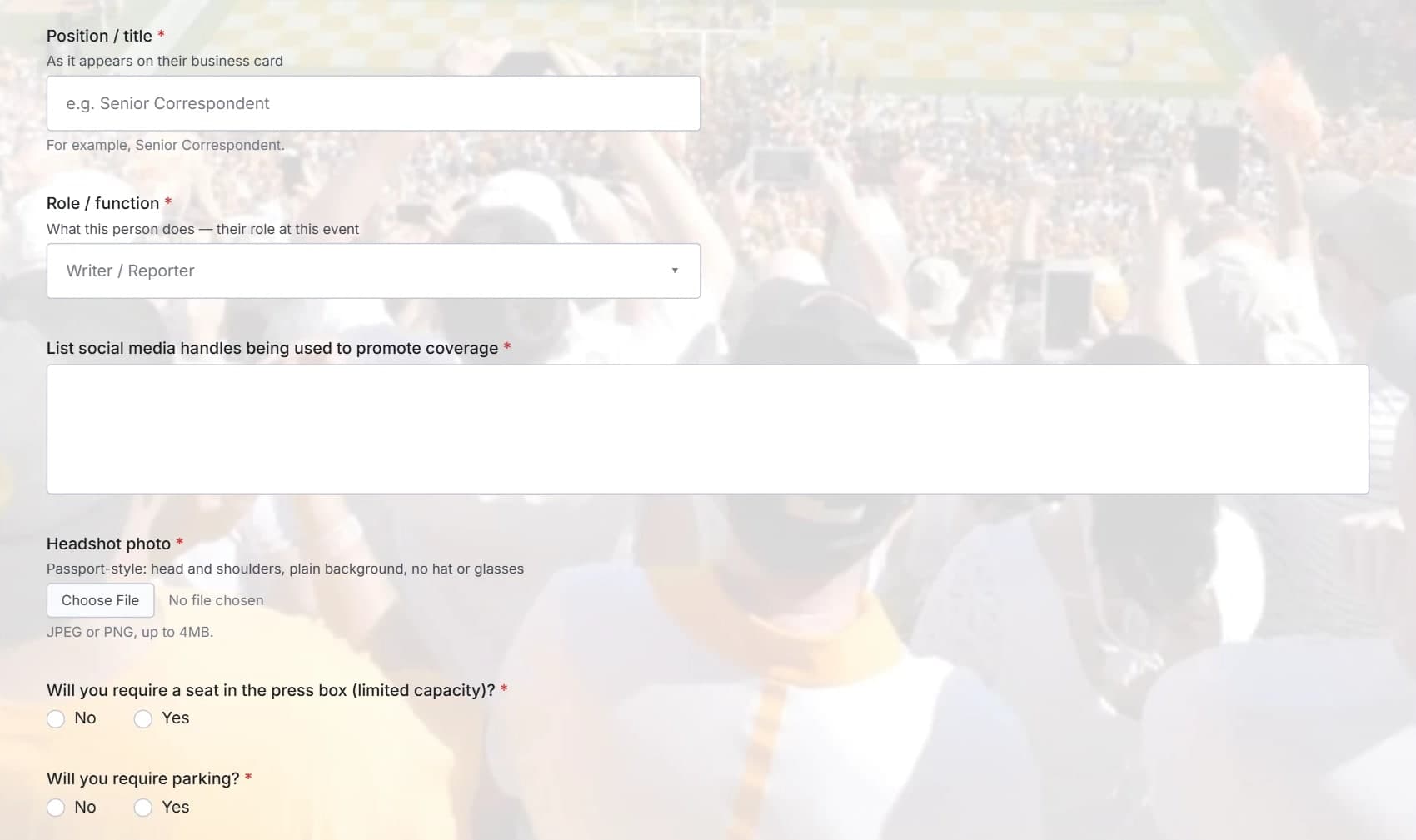
After their first application, additional ones are prefilled for them, and they can apply in Spanish. Plus, media can see the status of every application.
2Trust the source

I founded and led Sports Systems’ PressPass, which at its peak provided media credentialing to more than 1,000 college sporting events a year, including all NCAA championships, more than 35 annual bowl games, all CFP games, all top Division I conferences, and more than 75 DI sports information offices.
The company was sold, and now I’m back in college sports with what I always wanted to build: essentially PressPass lite. This new service is also a professional, end-to-end media credentialing service, but for events too small to need or afford PressPass – like basketball outside the power conferences and Olympic sports – even games with fewer than 10 total media.
Jim Daigle
Founder, CredsControl
- college events a year at PressPass’s peak
- 1,000+
- NCAA championships
- All
- Division I sports information offices
- 75+
3What it is
Start-to-finish media credentialing
- Your application formbuilt in minutes
- Media applyforms prefilled after the first application
- Review appsapplications are sorted and you make all decisions
- Approval/Denial emailsgo out in your words
- Badgesyou design and print
- Check-into record pick-up and no-shows
- Reportsgame, season, or all sports
4Who it’s for
Communications staff who receive and review media credential requests, who then have to email media about credentials, make game badges, and ultimately create post-game, post-season, and year-end attendance reports.
5How to switch
- 1
Create your free account
Just name, phone, email and self-set password.
- 2
Enter event details
Event name, date, and other info about the event.
- 3
Build your application form
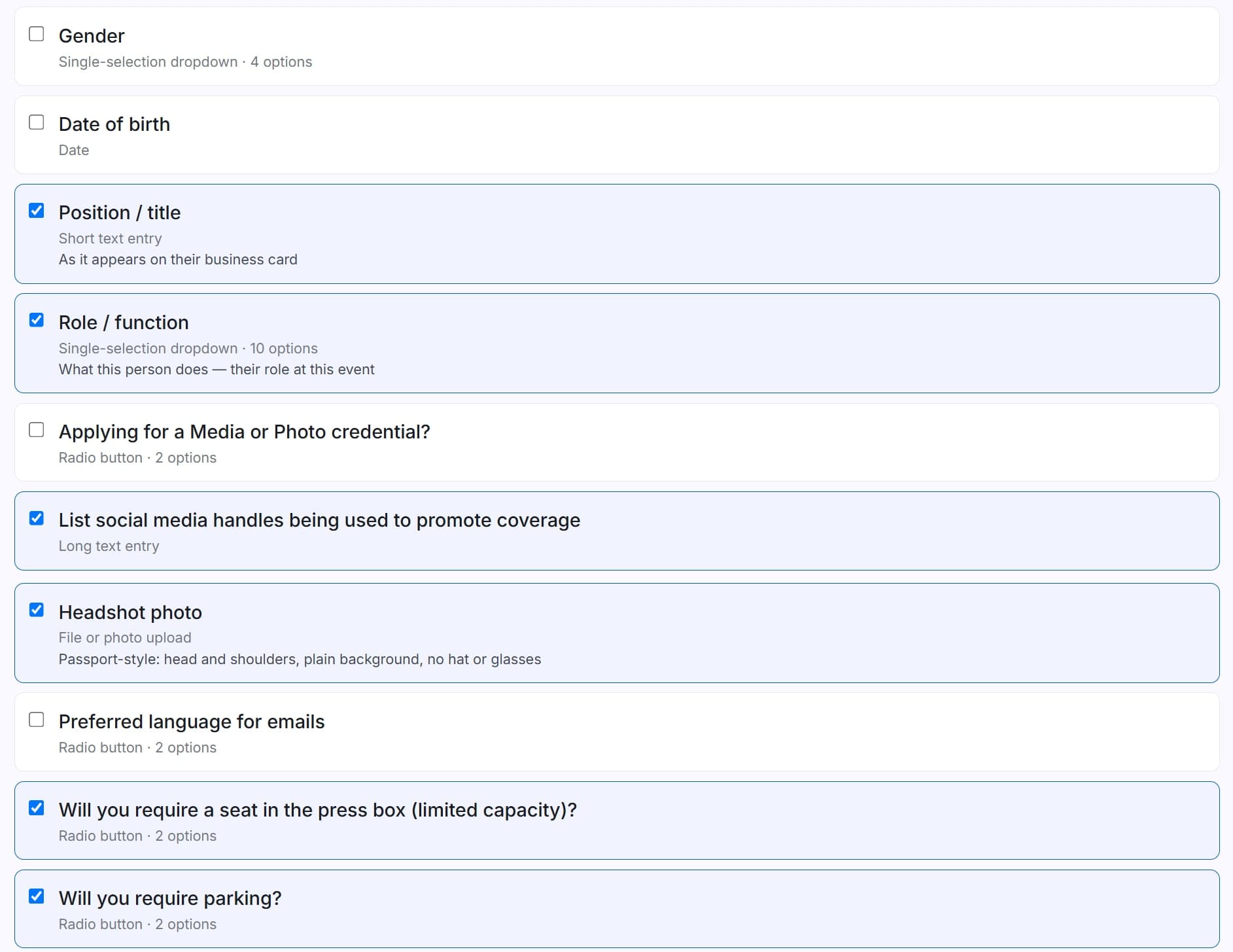
Tick the questions you want to ask to make your application form.
- 4
Swap the link
Replace your current form’s link on your media site with your CredsControl link, and also send it to visiting-team media officers.
Super-low cost
A game with 8 media costs $7.92 total. No setup fee, no per-event fee, and no contract.
Questions heard from other schools
Who is behind CredsControl?
Jim Daigle, who founded and led Sports Systems’ PressPass. At its peak PressPass credentialed more than 1,000 college sporting events a year, including all NCAA championships. CredsControl is the professional, end-to-end service he always wanted to build for events too small to need or afford PressPass.
Can I see it before I sign up?
Yes. The films above show both sides: what your staff see, and what media see when they apply. You can also open a free account and build your first event and its form; nothing is charged until after your first 50 applications.
Is it built for a school like mine?
It is built for college athletics communications offices, and especially for events too small for the big systems: basketball outside the power conferences and Olympic sports, even games with fewer than 10 media. It works for one sport or every sport in your department.
What does it cost?
The first 50 applications are free, then 99¢ per application. No setup fee, no per-event fee and no contract. As a launch promotion, the most you will pay for all usage through the end of the 2026-27 school year, season and game-by-game credentials included, is $199.
How is it billed?
By any payment card. Once you pass the free applications, you add a card on your billing page. Each month’s applications are charged on the 1st of the next month, never in advance, and a receipt is emailed to you.
What changes for my staff day to day?
Applications arrive already sorted into review queues for each sport season and game, with each applicant’s details, and a summary of the public record for media you don’t know. You approve or deny each in one click, and the email goes out in your words. Badges come from the approved list, check-in records who collected one, and game, season and year-end reports come from the same records.
What do my media have to do? Do they have to upload a driver’s license?
They apply through your link, as they do now, and sign in with a code emailed to them, so there is no password to remember. After their first application, the next ones are prefilled. An ID is asked for only if you choose to ask for one: you tick every question on your form. They can apply in Spanish, and they can see the status of every application.
Is our media’s information safe? Who can see it?
Your staff, and only the people you give access to: a visiting team’s media officer can see the applications for an event – if you open their ability to vouch for media they know, and a report you share is seen by the person you share it with. We do not sell data, use it to train AI models, or send marketing email from it. The Privacy Policy sets out exactly what is held, who receives it and why.
Can I talk to someone first?
Yes. , or email Jim Daigle at Jim@MediaCredentialing.com, and he will answer you himself.
Who else is using it?
CredsControl is new this season, so your school would be among the first, and the launch promotion is priced for exactly that: a whole school year capped at $199.
Does AI make the decisions?
No. AI does the checking: it checks that badge photos follow your rules, reads an ID to fill in the application where you ask for one, compares the face on the ID with the photo, and researches applicants you have never met, showing its sources. You make every decision.
How long does it take to set up?
Under 15 minutes for your first event. Each event after that reuses your form and email settings, so it is live in under five.
Do we need IT, or a change to our athletics website?
No. There is nothing to install. You replace the link to your current credential form on your media page with your CredsControl link.
Does it handle season credentials and visiting teams?
Yes. Season credentials and game-by-game applications both, or a single application form for several games.
Can I try it on one game, or one sport, first?
Yes. There is no contract and no setup fee, and the first 50 applications are free, so one game or one sport is an easy place to start.
Can a colleague use it too?
Yes. Add a colleague when you sign up or later. They get their own sign-in, so security ensures that each user logs in with their own email address.
Can it carry our school’s branding?
Yes. Each application form can carry either a school or event logo plus a background image, approval and denial emails go out in your words, and you design your own badges.
Can reports be exported or shared?
Yes. Any report can export to Excel, with the columns, filters and sort order you choose. And reports can be securely shared with managers and others who want to see live data without you having to manually export regular reports to them.
Try it on your next home game.
Click here!